Digging into sync.Once: How Go Ensures One-Time Execution

How it started?
While writing some concurrent code for Blinkit, I found myself reaching for sync.Once—a common utility in Go to ensure an action is performed just once, no matter how many goroutines attempt it. Out of curiosity, I decided to dig into how sync.Once works internally and how its implementation has evolved over time. While investigating the internals I came across something interesting and ended up contributing myself — a small step, but super rewarding!
In this blog, I’ll walk through the internals of sync.Once, how it leverages atomics for performance, and trace its evolution through Go versions. This blog is meant to motivate you to explore and solve your own doubts by diving into the source code of Go itself. You’ll be amazed at how much you can learn just by following the code and seeing how things work behind the scenes!
Prerequisites: What's sync.Once?
sync.Onceensures a function is only executed once, no matter how many times it's called, even across goroutines.- It's most commonly used to initialize shared resources like config, DB connections, or singletons.
var (
	readConfigOnce  sync.Once
	config          *Config
)

func GetConfig() (c *Config) {
	readConfigOnce.Do(func() {
		// Read yaml and make config object
	})
	return config
}

func main() {
	cfg := LoadConfig()
	fmt.Println(cfg)
}
Link to sync.Once documentation
Digging into sync.Once internals?
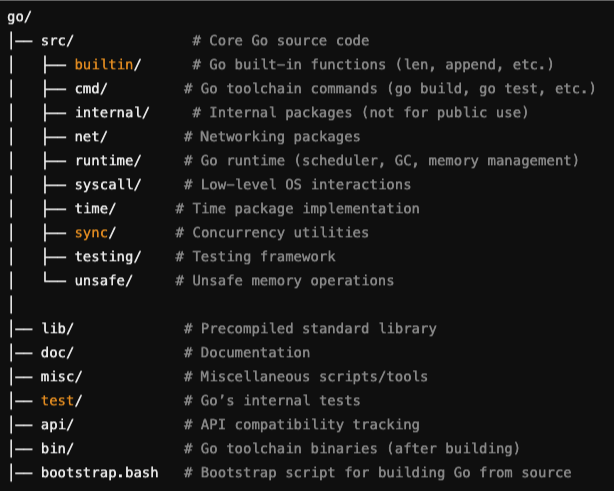
To follow along this read feel free to clone the Golang repository.
- Open the repository and run the bash script
./make.bash, to build and install the latest compiler of Go. - Point your system or editor (like VSCode) to use the newly built Go version:
When I first came across the concept of a bootstrapped compiler, it honestly felt like a total brain teaser. The idea that a compiler could be written in the same language it’s supposed to compile? Wild.
Here’s the bombshell: the Go compiler is written in Go itself. Sounds paradoxical, right?
Like a classic chicken-and-egg dilemma - “How can a compiler compile itself if it doesn’t exist yet?”
In programming, bootstrapping refers to: The process of building a system using a simpler or initial version of itself.
make.bashis a shell script located atsrc/make.bashinside the Go source tree.- It's used to bootstrap the Go toolchain — it builds the Go compiler (
cmd/compile), linker (cmd/link), and other core tools from scratch using the Go bootstrap toolchain. - It uses the already installed Go compiler
- Use the clones Golang source code to build the new version of Go.
Internals (Go 1.18)
Let's start from the basics, struct of sync.Once looks like
type Once struct {
	done uint32
	m    Mutex
}
Pretty simple, right?
- One
uint32flagdonedone == 1means that the function has ran oncedone == 0means that the function hasn't ran yet
- One mutex
m- A mutex to avoid race condition while updating
done
- A mutex to avoid race condition while updating
Ok, somehow these two are used together to:
- Ensure that a particular action executes only once, regardless of how many times it is called concurrently.
- Achieve this guarantee efficiently, minimizing lock contention for better performance.
Ok so far so good right?
Let's move to the implementation of once.Do(f): It ensures that the function f() is only executed once, no matter how many times it's called—even if from multiple goroutines.
func (o *Once) Do(f func()) {
	if atomic.LoadUint32(&o.done) == 0 {
		o.doSlow(f)
	}
}
Goal: Avoid acquiring a mutex unless absolutely necessary (i.e., the function f() hasn’t run yet).
if atomic.LoadUint32(&o.done) == 0- We check if
done == 0,done == 0means that the function hasn't ran yet - It checks
done == 0atomically in one operation. More aboutatomic package
- We check if
func (o *Once) doSlow(f func()) {
	o.m.Lock()
	defer o.m.Unlock()
	if o.done == 0 {
		defer atomic.StoreUint32(&o.done, 1)
		f()
	}
}
if o.done == 0- A second check inside the locked section.
- Why? Because multiple goroutines might pass the atomic check in Do(), but only one should actually run the function. So we check again inside the lock to be 100% sure.
- This is a double-checked locking pattern.
defer atomic.StoreUint32(&o.done, 1)- Marks the function as executed after
f()is done. - It’s deferred so even if
f()panics, we still consider it “done” and don't call it again (intentional in Go’s design).
- Marks the function as executed after
Internals (Go 1.24)
In newer versions of Go they revised the implementation of how sync.Once.
type Once struct {
	_ noCopy
	done atomic.Uint32
	m    Mutex
}
Ok! What's changed now?
noCopyis embedded inOncestruct- done is
atomic.Uint32notuint32
"noCopy" What's that?
- It'a a zero-size struct that is adds no memory overhead.
- Go has a statical analysis tool
go vetthat checks your Go source code for common mistakes and suspicious constructs that the compiler won’t catch. - Some types must never be copied once they’ve been initialized—most notably synchronization primitives like
sync.Mutex,sync.Once, etc. Accidental copies can lead to deadlocks or data races. - Having
noCopyembedded in your struct will produce a warning if your type is ever copied bygo vet.
Regular uint32 vs. atomic.Uint32
When you don't know something in Go let's follow the approach like we have done, and let's look at the source code:
type Uint32 struct {
	_ noCopy
	v uint32
}
- Ok, wow! As you can see
atomic.Uint32is just a wrapper type around a uint32 withnoCopybut why???
Let's look further functions binded to this struct:
// Load atomically loads and returns the value stored in x.
func (x *Uint32) Load() uint32 { return LoadUint32(&x.v) }

// Store atomically stores val into x.
func (x *Uint32) Store(val uint32) { StoreUint32(&x.v, val) }

// Swap atomically stores new into x and returns the previous value.
func (x *Uint32) Swap(new uint32) (old uint32) { return SwapUint32(&x.v, new) }

// CompareAndSwap executes the compare-and-swap operation for x.
func (x *Uint32) CompareAndSwap(old, new uint32) (swapped bool) { return CompareAndSwapUint32(&x.v, old, new) }
Ok, seems like it's just a wrapper type provides methods for atomic operations.
And that is exactly what atomic.Uint32 is:
A Go 1.19+ wrapper type around a uint32 that provides methods for atomic operations
Bonus: Go. 1.25 (Hopefully)
While exploring the internals of sync.Once, I noticed that the done field — which indicates whether the function has already been executed — was originally an atomic.Uint32.
However, since it’s only ever used as a boolean flag (0 or 1), I realized it could be more semantically clear to use atomic.Bool instead. Even though atomic.Bool is just a thin wrapper around a uint32 under the hood, switching to it makes the code more self-explanatory and aligns better with the intent of the field.
So I decided to raise a PR and it got merged :)
Now the struct looks like this:
type Once struct {
	_ noCopy
	done atomic.Bool
	m    Mutex
}
Conclusion
Exploring sync.Once from Go 1.18 to Go 1.25 shows how a small, fundamental primitive can evolve for clarity, safety, and maintainability:
- Go 1.18
- Used a plain uint32 flag plus a Mutex and double‑checked locking
- Minimized lock contention by atomically checking the flag on the fast path
-
Go 1.24
- Embeds
noCopyto catch accidental copies via go vet - Switches to
atomic.Uint32, providing a clean, method‑based API
- Embeds
-
Go 1.25
- Switches
atomic.Uint32toatomic.Bool
- Switches
Along the way we’ve seen:
- Bootstrapping – how Go builds itself from source via make.bash
- Atomic vs. mutex – why lock‑free fast paths matter in high‑concurrency code
- Static analysis – how noCopy and go vet help prevent subtle bugs
The beauty of Go’s standard library is that it balances performance, safety, and readability. Whenever you have a question about how Go works under the hood, the answer is just a GitHub clone and a make.bash away. Dive into the source, follow the code, and you’ll not only solve your doubts—you’ll discover deeper principles that make Go such a pleasure to work with.
And it’s downright fun to see how these technologies evolve over time.